Advanced 3D URDF Robotic Model Viewer
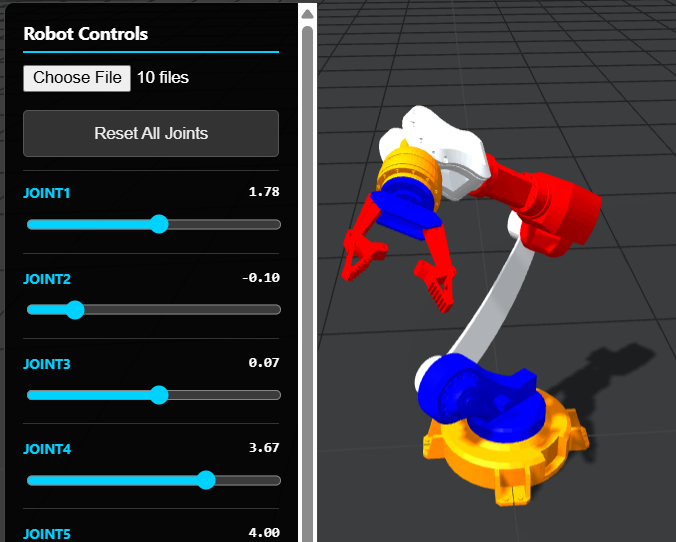
A professional-grade, browser-based URDF viewer featuring real-time joint control, soft shadow rendering, and mobile-responsive design. Upload your robot folders and visualize STL kinematics instantly with high-fidelity WebGL performance.
Click here to access.
1. The Core Engine
The "brain" of the application is built on URDFLoader.js, a specialized extension for Three.js.
- Kinematic Parsing: The engine parses XML-based URDF (Unified Robot Description Format) files to establish the hierarchical relationship between "links" (the parts) and "joints" (the pivots).
- Blob URL Mapping: To handle local security restrictions, the engine uses
URL.createObjectURLto map local folder files into memory. This allows the loader to resolve complex relative paths for.stlmeshes without a backend server. - Joint State Management: The engine dynamically scans the robot’s tree, identifies non-fixed joints, and maps them to interactive UI sliders.
2. Rendering Technology
The visual fidelity is powered by WebGL via the Three.js library, utilizing a modern physically-based rendering (PBR) pipeline.
- Shadow Mapping: It utilizes
THREE.PCFSoftShadowMapto provide realistic, filtered shadows that help users perceive the robot's distance from the ground plane. - Dynamic Lighting: A three-point lighting setup is used:
- Ambient Light: Provides base visibility.
- Hemisphere Light: Simulates outdoor/indoor environmental gradients.
- Directional Light: Acts as the primary "Sun," casting high-resolution shadows.
- Performance Optimization: The renderer uses
setPixelRatioto ensure the 3D model looks sharp on high-density displays like 4K monitors and modern tablets.
3. Mathematical Tools
Robotics visualization relies heavily on linear algebra and trigonometry, handled seamlessly under the hood.
- Coordinate Transformations: The tool handles the conversion between the URDF standard (often Z-up) and the Three.js coordinate system (Y-up) by applying a pi/2 rotation to the x-axis.
- Bounding Box Calculation: Using
THREE.Box3, the application calculates the geometric center of the uploaded model to automatically focus the camera, regardless of whether the robot is a small drone or a large industrial arm. - Euler & Quaternion Rotations: Joint limits (min/max) defined in radians are mapped to the robot’s local transform matrices to ensure realistic movement within defined physical constraints.
4. Front-End Environment
The interface is designed as a "Heads-Up Display" (HUD) that stays functional across all devices.
- Responsive UI: The CSS uses Media Queries to adapt the control panel. On mobile, the UI shifts to the bottom and expands horizontally to ensure sliders are "thumb-friendly."
- Security & Integrity: A unique MutationObserver script monitors the DOM. If the copyright branding or site links are removed or hidden, the environment triggers a hard reset, ensuring the developer's credit remains intact.
- Event-Driven Controls: The
OrbitControlsintegration allows for intuitive 3D navigation (rotate, zoom, pan) using standard mouse or touch gestures.