Interactive 2-DOF Vibration Lab
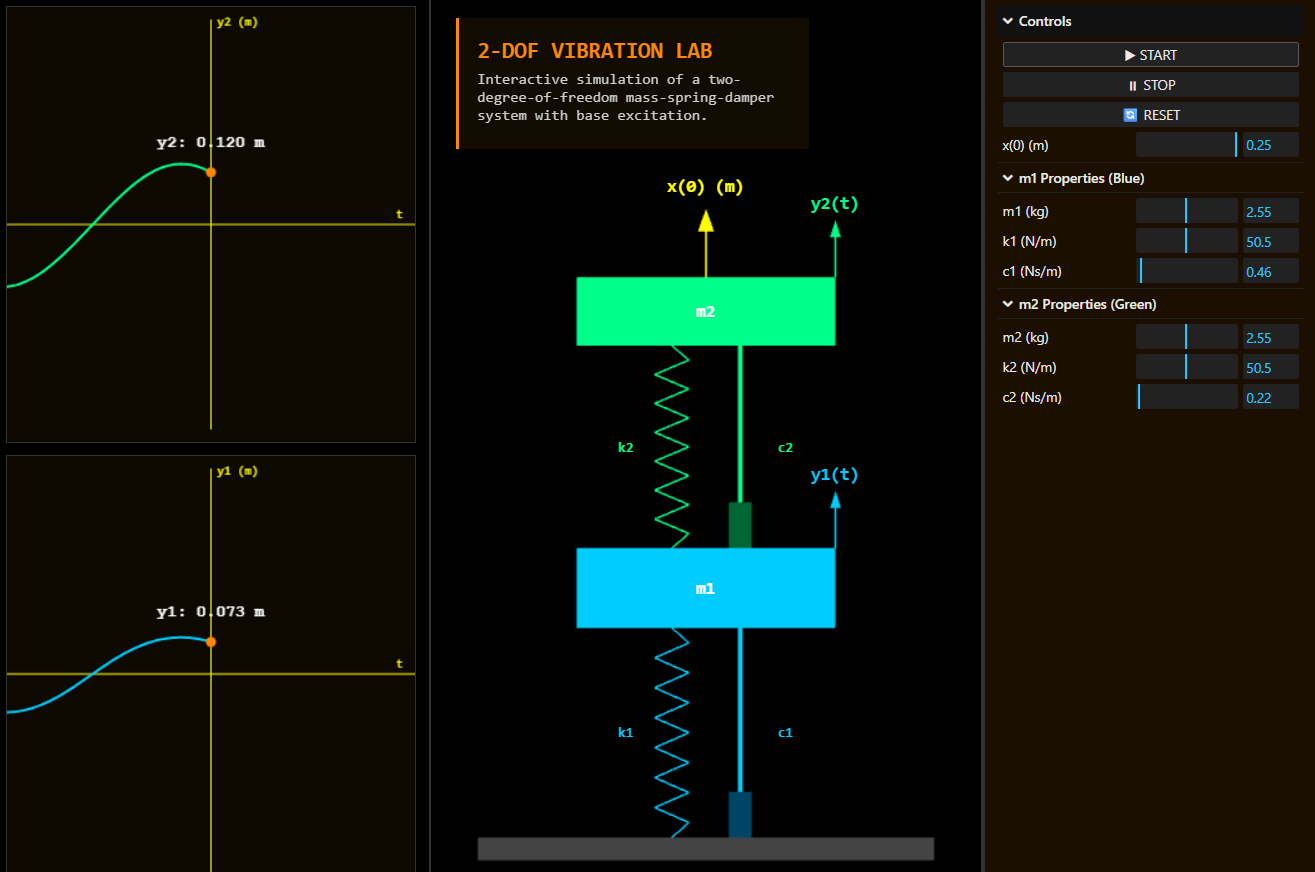
This interactive lab is a high-fidelity web simulation of a Two-Degree-of-Freedom (2-DOF) mechanical system. Designed for engineering students and hobbyists alike, the application allows users to manipulate the physical properties of a dual mass-spring-damper system and observe complex vibrational behaviors—such as resonance and coupled oscillation—in real-time through a sleek, modern browser interface.
Click here to access.
The Core Engine: Numerical Physics
The "brain" of this application is a numerical integrator located within the loop() function. Rather than using a simplified animation, the code calculates the acceleration, velocity, and displacement of both masses at every frame.
- Coupled Equations: The system accounts for the interaction between the two masses. When m1 moves, it exerts a force on m2 through the connecting spring (k2) and damper (c2), and vice versa.
- The Euler Method: The engine uses a discrete time-step (Delta t) to update the state of the system:
- Calculate acceleration (a) based on Sum of Forces / Mass.
- Update velocity: vnew = vold + a.dt.
- Update position: xnew = xold + v.dt.
Rendering Technology: Three.js
To move beyond flat 2D shapes, the lab utilizes Three.js, a powerful WebGL library.
- 3D Scene Geometry: The masses are rendered as
BoxGeometrywithMeshPhongMaterialto react to theAmbientLight. - Procedural Animation: Unlike static assets, the springs ($s1, s2$) are generated as
BufferGeometry. They are redrawn every frame using a loop that creates a "zigzag" path between the moving masses, simulating realistic expansion and contraction. - Dynamic Scaling: The size of the cubes in the viewport is tied directly to the
m1andm2parameters, providing immediate visual feedback on the "heaviness" of the components.
Mathematical Tools: Signal & Data Visualization
A critical part of any engineering simulation is the ability to analyze data. This lab implements a custom graphing utility using the HTML5 Canvas API.
- Live Displacement Tracking: The
drawGraphfunction maintains a history array of the last 300 data points. - Coordinate Mapping: The code maps physical displacement (in meters) to pixel coordinates on the canvas. It features a fixed scale allowing for an accurate comparison of amplitudes between the two masses.
- Vector Projection: To keep the text labels (k1, c1, m1) attached to the 3D moving parts, the code uses
THREE.Vector3.project(camera). This converts 3D world coordinates into 2D screen pixels.
Front-End Environment
The user interface is built for professional utility and responsiveness:
- lil-gui Integration: This industry-standard controller allows for precise "tuning" of the simulation. Users can toggle the "Start/Stop" state or reset the system to its default equilibrium.
- Responsive Grid: The layout uses CSS Grid to maintain a "mission control" feel. On desktop, it splits into three columns (Graphs | Simulation | Controls), while a
@mediaquery stacks these elements vertically for mobile devices. - Integrity Protection: A
MutationObserveris implemented as a security layer to ensure the attribution and licensing information remains visible, effectively preventing the UI from being stripped of its original branding.