Interactive Modal Analysis: Simulating Cantilever Beam Resonance
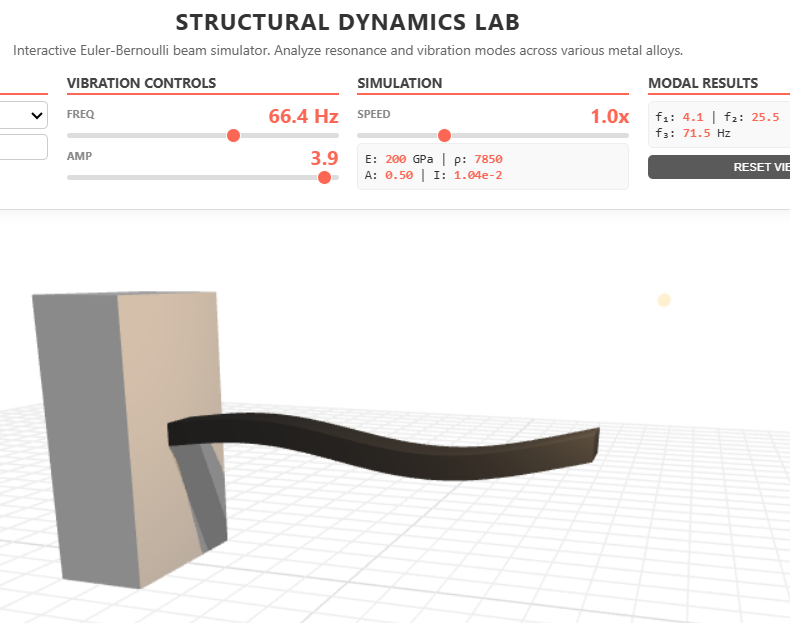
Ever wonder why diving boards bounce the way they do? This interactive tool lets you change the board's material and dimensions to see how "Mode Shapes" change. A perfect visual guide for students studying mechanical engineering and structural resonance.
Click here to access.
1. The Core Engine: Euler-Bernoulli Structural Dynamics
The heart of this simulation is a physical engine built on the Euler-Bernoulli beam theory, which governs the relationship between a beam's geometry, material properties, and its vibrational response.
- Dynamic Material Library: The engine utilizes a lookup table for five distinct engineering materials, pulling specific values for Young’s Modulus (E) and Density (rho).
- Geometric Integration: It dynamically calculates cross-sectional properties, including the Area (A) and the Second Moment of Area (I), which determines the beam's resistance to bending.
- Eigenmode Solver: The code solves for the first three natural frequencies using the cantilever boundary condition coefficients (beta1, beta2, beta3), allowing the simulation to predict exactly where resonance will occur.
2. Rendering Technology: WebGL & GLSL Shaders
The project uses Three.js to handle the 3D scene, but leverages custom GLSL (OpenGL Shading Language) for high-performance physics visualization.
- Vertex Shader Displacement: Instead of traditional animation, the "bending" of the beam happens directly on the GPU. The vertex shader manipulates the 3D mesh in real-time based on sine-wave functions and the selected eigenmode.
- Physically Based Rendering (PBR): The light-orange wall utilizes
MeshStandardMaterialwith high metalness and low roughness to simulate a polished industrial finish. - High-Brightness Environment: The scene employs an
AmbientLightandDirectionalLightcombo with a pure white background and a Reflector floor to create a high-contrast studio aesthetic.
3. Mathematical Tools: Modal Scaling & Logic
The code performs complex mathematical operations to bridge the gap between abstract physics and user interaction.
- Modal Crossover Logic: An algorithm determines which "Mode Shape" to display based on how close the user's selected frequency is to the calculated natural frequencies (fn1, fn2, fn3).
- Dynamic Range Scaling: To ensure a relevant user experience, the frequency slider’s maximum value is mathematically tied to $1.5 \times$ the third mode frequency, preventing the UI from becoming obsolete if a much stiffer material is selected.
- Spatial Attenuation: A power function (
pow(xNorm, 1.5)) is applied to the displacement math to realistically simulate the "fixed" end of a diving board, ensuring zero movement at the wall and maximum deflection at the tip.
4. Front-End Environment: Interactive Control Suite
The user interface is designed for immediate feedback and scientific clarity, built with clean, modern web standards.
- Vertical Control Sidebar: A dedicated left-side menu organizes inputs into logical sections: Material Selection, Geometry Dimensions, and Excitation Controls.
- Real-Time Data Overlay: A "Physical Results" math box serves as a live dashboard, displaying calculated area, inertia, and frequency data as fast as the user can move the sliders.
- State Management: The Reset Defaults feature utilizes a constant data object to instantly restore the simulation's "Factory Settings," allowing for easy experimentation.
- Responsive Viewport: The environment is built with a flexible container system that automatically resizes the WebGL canvas to fit any screen or blog layout.