Interactive Tea Steeping Guide
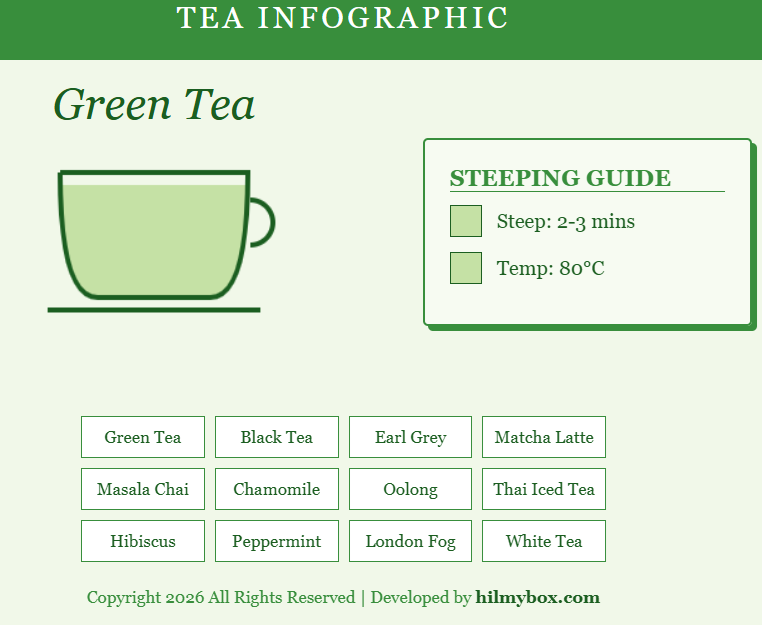
This interactive tool visualizes the composition and preparation requirements for various types of tea. It uses a dynamic HTML5 Canvas to "pour" the tea into a cup based on your selection.
Click here to access.
1. The Core Engine
The core of this application is a State-Driven Animation Engine powered by GSAP (GreenSock Animation Platform).
- Dynamic State Management: The engine maintains an object called
levels, which tracks the height of three distinct liquid layers:bottom,middle, andtop. - Reactive Transitions: When a user selects a new tea type via the
updateTea()function, the engine doesn't just swap the image. It calculates the new target heights and uses GSAP to interpolate (tween) the values from the old state to the new state over 0.6 seconds. - Synchronization Loop: The
onUpdate: drawcallback ensures that the rendering technology is refreshed every time the math engine changes a single pixel value, creating a smooth "pouring" or "filling" effect.
2. Rendering Technology
The visuals are rendered using the HTML5 Canvas API, a low-level, immediate-mode bitmapped web technology.
- Immediate Mode Rendering: Unlike standard HTML elements, the cup is "painted" frame-by-frame. The
draw()function clears the entire canvas (clearRect) and redraws the geometry from scratch at every update. - Path Clipping: To ensure the tea stays "inside" the cup, the code uses
ctx.clip(). It defines a specific path (the cup's silhouette with rounded corners) and restricts all subsequentfillRectcommands to only appear within that boundary. - Vector Stylization: The cup's handle and saucer are drawn using native canvas path commands (
arc,moveTo,lineTo) with a specificlineWidthandstrokeStyle, mimicking vector illustration style.
3. Mathematical Tools
The project relies on Euclidean Geometry and Interpolation Math to construct the interactive cup.
- Quadratic Bezier Curves: The rounded bottom of the cup is calculated using
quadraticCurveTo(cp x, cp y, x, y). This uses a control point to mathematically determine the slope of the curve for a smooth, organic feel. - Stacking Algorithms: The position of the middle and top layers is determined by additive subtraction:
- Bottom Layer Y:
BaseY + Height - level.bottom - Middle Layer Y:
BaseY + Height - level.bottom - level.middle
- Bottom Layer Y:
- Linear Interpolation (Tweening): GSAP handles the calculus of easing, moving the liquid levels not at a constant speed, but with a "Power" curve that starts fast and slows down, making the motion feel more natural.
4. Front-End Environment
The environment is a Modern Web Interface designed for educational clarity and responsiveness.
- CSS Variable Theming: The interface uses a
--bg-colorand--accentsystem. This allows for global design changes by updating a single line of code, ensuring the "Tea" aesthetic remains consistent across headers and buttons. - Grid System Layout: The "Tea" selection buttons are organized using CSS Grid (
grid-template-columns: repeat(4, 1fr)). This environment is fully responsive; a media query adjusts the grid to 2 columns on mobile devices to prevent UI overlap. - Integrity Monitoring: A unique security feature is included in the environment—a
setInterval"watchdog" script that scans the DOM every 5 seconds to ensure the developer's attribution remains intact, demonstrating an "Integrity Protection" pattern.