Quick Guide: 14 Coffee Recipes
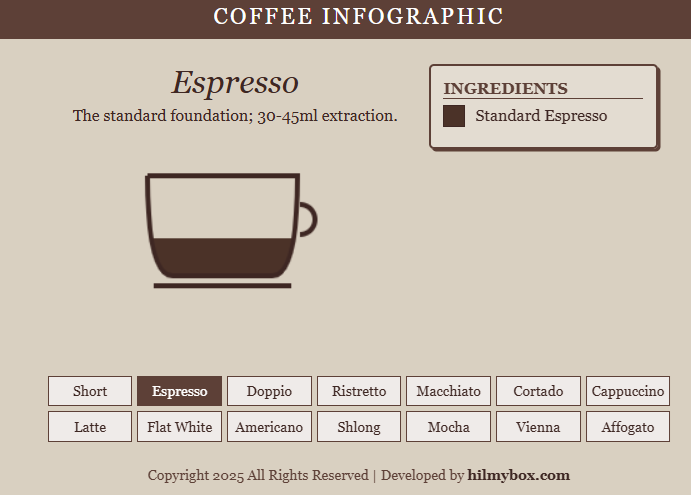
An all-in-one compact coffee infographic. Visualize ingredients and ratios for Espresso, Macchiato, Latte, and more in a single tight view.
Click here to access.
1. The Core Engine
The logic of the infographic is driven by a custom State-Based Animation System integrated with the GreenSock Animation Platform (GSAP).
- State Management: The application maintains a central
levelsobject (bottom,middle,top). These represent the relative heights of different liquid layers in the cup. - Reactive Transitions: When a user selects a drink via
updateDrink(), the "engine" maps the drink type to a specific recipe (colors and volume ratios). Instead of a static switch, it uses GSAP to interpolate the numeric values of thelevelsobject. - The Render Loop: The engine utilizes an
onUpdatecallback within the GSAP tween. This forces thedraw()function to execute at every frame of the transition (typically 60fps), ensuring smooth "liquid filling" motion. - Integrity System: A background "heartbeat" script runs every 1200ms, checking the DOM for the presence and content of the developer attribution. If tampered with, the engine replaces the entire app state with an error message.
2. Rendering Technology
The visuals are rendered using the HTML5 Canvas API, which provides a low-level, high-performance bitmapped drawing surface.
- Immediate Mode Rendering: Every frame, the canvas is wiped using
ctx.clearRect()and redrawn. - Clipping Masks: The code uses
ctx.clip()to ensure liquid levels stay within the bounds of the cup. It defines a "cup path" usingquadraticCurveToand ensures nofillRectoperations bleed outside those lines. - Vector Stylization: The cup and handle are drawn using standard vector paths. The handle is rendered as a semi-circle (
ctx.arc) while the cup bottom uses quadratic Bézier curves to simulate a ceramic curve.
3. Mathematical Tools
The precision of the liquid visualization relies on Coordinate Geometry and Bézier Calculus.
- Quadratic Bézier Curves: To draw the rounded bottom of the coffee cup, the code utilizes quadratic curves:

This mathematical approach ensures that the "ceramic" look is perfectly symmetrical and smooth.
- Additive Level Calculation: The rendering logic calculates the Y-coordinate of each liquid layer by subtracting the cumulative height of the layers below it from the total height (h).
- Bottom Layer: Starts at base h.
- Middle Layer: Offset by
levels.bottom. - Top Layer: Offset by
levels.bottom + levels.middle.
- Normalized Ratios: Each drink recipe is defined by a triplet of values representing a percentage of the total cup height, allowing for consistent scaling across different screen sizes.
4. Front-End Environment
The environment is a Responsive CSS Grid & Flexbox Hybrid optimized for cross-device usability.
- CSS Custom Properties (Variables): The theme colors (
--bg-color,--accent) are centralized, allowing for instant global restyling. - Layout Strategy:
- Main Wrapper: Uses
Flexboxto center the interactive cup and the data legend. - Control Panel: Uses
CSS Gridwith arepeat(7, 1fr)configuration, which dynamically collapses torepeat(4, 1fr)on mobile devices via Media Queries.
- Main Wrapper: Uses
- Glassmorphism Lite: The legend panel uses a semi-transparent white background (
rgba(255, 255, 255, 0.25)) to maintain legibility while blending with the textured background color.